A context layer for AI agents is a shared record of team facts that your people's agents read before they answer or act. It holds who owns what, what was decided, what was promised and how the team has agreed to work. Claude, ChatGPT, Codex or Slackbot can reach it through a connection such as the Model Context Protocol (MCP), which should apply the asking person's permissions. For a team of 10 to 50 people, start with owners, decisions and promises. Keep private judgements about people out of it. Then test it by asking an agent about something that changed last week.
What you'll learn
- What a context layer for AI agents holds for a small team, and what stays out.
- Three ways to give agents team context, and when each is enough.
- A short test of whether an agent answers from current facts.
What a context layer for AI agents is
An agent can only work with what is in front of it when it runs: the request, any files, the results of the tools it can call. Anthropic's engineers describe arranging that material as context engineering and treat context as a finite resource, so more material is not automatically better. In many small teams, the facts an agent needs aren't in any of those places. They sit in Slack threads, task comments, call notes and people's heads, and people may paste their own version into their own tool.
MCP is one way agents can reach such a record. Its documentation calls it "an open-source standard for connecting AI applications to external systems". MCP carries the request and the answer. Deciding which facts are current and what happens when two notes disagree is the layer's job, and so is keeping each person to what they may see.
What belongs in it for a 10-50 person team
The vendor guides that rank for this term in November 2026 mostly describe company data: metrics, customer records, documents. A 20-person team without a data warehouse may have little of that to organise. Facts about people and agreements can go missing instead, because they change in conversation and may never reach a system. Fill the layer with these first.
| Kind of fact | Example | Where it often lives | Why an agent needs it |
|---|---|---|---|
| Owners | Priya owns the Northwind account from 1 November. | A Slack message or a field in the CRM | Drafts, escalations and questions can go to the current owner. |
| Decisions | Discounts above 5% need the founder's approval. | A meeting note or a task comment | The agent can avoid proposing something already ruled out. |
| Promises | We told Northwind the migration plan would arrive by Friday. | A client email or call notes | Status updates can include what is still owed. |
| Working agreements | Urgent client requests go to the support channel, not to direct messages. | A pinned message or the handbook | Requests can be routed the way the team agreed. |
| How people prefer to work | Julian prefers a written brief before a call. | A working manual the person wrote | Prepared messages fit the person, using only what they chose to share. |
Three ways to give agents team context
| Approach | What the agent sees | How current it stays | Who controls access |
|---|---|---|---|
| A note pasted into prompts or project instructions | Whatever one person wrote, usually once | It can go stale unless someone updates it | Whoever has a copy of the note |
| Each agent connected to your work tools | Raw messages, tasks and files it can search | As current as the tools it reads, but the agent has to work out which message settled the question | Each tool's own permissions, set up separately for each agent |
| A maintained context layer | Owners, decisions and promises kept as facts, with where they came from | Current as long as people update and check it | One place, with each person's permissions applied |
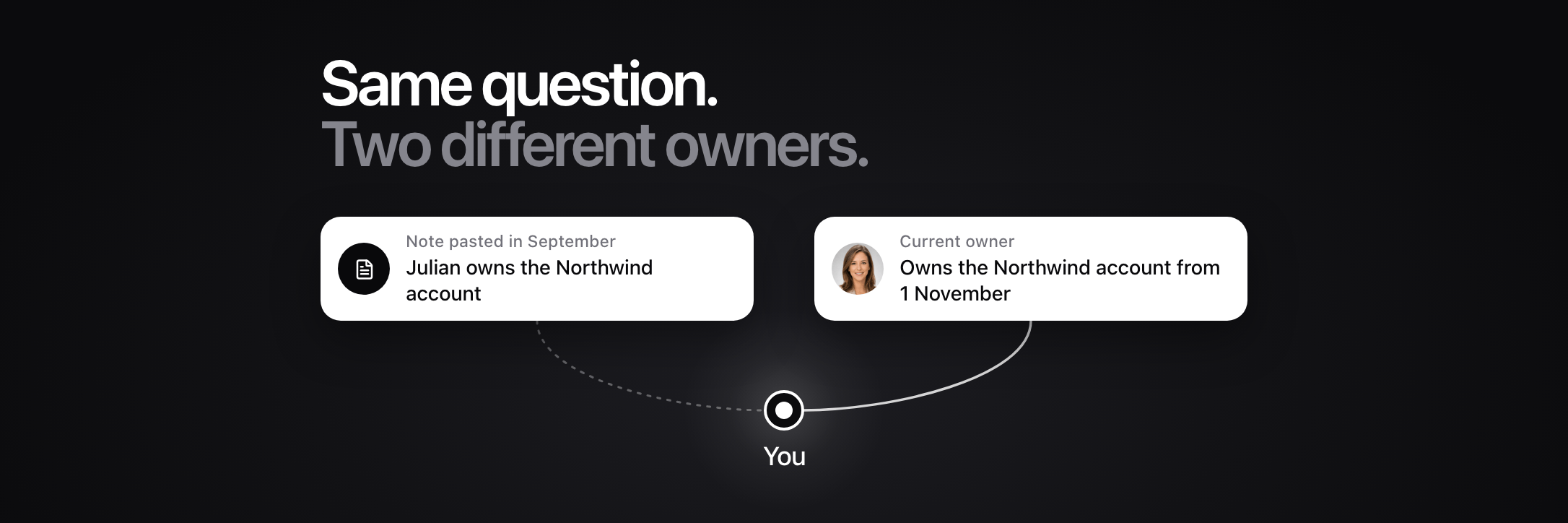
A five-person team may manage with a pasted note. It may stop being enough when people's agents give different answers to the same question, or when someone works from an owner or a price that changed weeks ago. In this hypothetical example, a project note pasted in September still says Julian owns the Northwind account, although it moved to Priya on 1 November. Pasting has another cost: people already copy company information into AI tools themselves.
The figure is self-reported, global and collected before most agent tools existed, and its base appears to be employees who use AI at work rather than everyone surveyed. It doesn't single out small companies or show that any harm followed. Among the same employees, the behaviour was more common where generative AI was banned (67%) than where there was no policy (33%). That comparison doesn't show that bans cause it, but it is a reason for a founder to offer an approved route for team context instead of relying on a ban.
Cooperly is built as a context layer for AI agents that covers people context. It keeps working profiles, goals and team memory current and supplies the relevant part to approved tools such as Claude, Codex, ChatGPT and Slackbot; the AI context layer page shows how access and confirmation work. Whichever route you choose, the test below works the same way.
Permissions: what each agent may read and change
The MCP specification puts the principle plainly: "Users must explicitly consent to and understand all data access and operations." In a small team that comes down to three rules. Reading should follow the asking person's role and team, so that an agent working for a salesperson can't open the hiring pipeline just because the founder's agent can. Writing should be a separate permission, granted on purpose. And a change an agent proposes, such as a new owner or a moved deadline, should wait until a person confirms it, because the next agent may treat it as fact.
How to test whether your agents use current context
- 01
Pick three recent changes
An owner who changed, a decision that was reversed and a deadline that moved, each within the last two weeks.
- 02
Ask in a fresh conversation
Paste nothing. Ask the way a teammate would: "Who owns Northwind now?" or "What did we promise Northwind this week?"
- 03
Check the answer and where it came from
Ask the agent which source it used and how old that source is. A right answer from an old note doesn't show that the agent used the current record.
- 04
Sort each failure
Start with three common causes, which aren't the only ones. The fact was never recorded anywhere the agent can reach, the agent can't reach the place it was recorded, or the agent found an old and a new version and chose the old one. Fix the record, mark the old version as replaced, or repair access within the asking person's existing permissions.
- 05
Repeat after changes
Run the same three questions after a reorganisation, a new hire or a change of tools, and once a month otherwise.
Here is a hypothetical example. In a 22-person agency, a weekly client update drafted with ChatGPT leaves out the migration plan promised on Tuesday's call. The promise sits in the call notes, which nobody connected. Before the update is drafted again, the account owner records the promise where the agents can read it.
When an agreed owner or approval rule changes and an agent keeps the old one, keeping shared AI context current walks through the repair. If people on your team already ask an AI tool before they ask you, read when an employee asks AI first; if they use tools nobody approved, start with how to manage shadow AI at work.